from selenium import webdriver as wb # 브라우저를 조작하는 도구
from selenium.webdriver.common.keys import Keys # 키 입력을 도와주는 도구(키보드)
from bs4 import BeautifulSoup as bs # 문서를 파싱해서 선택자 활용을 도와주는 도구
from tqdm import tqdm # 반복문 진행 정도를 시각화해주는 도구
from urllib.request import urlretrieve # 이미지 다운로드를 도와주는 도구
import time # 시간제어 도구
import os # 폴더 생성,삭제,이동 등을 도와주는 도구

import chromedriver_autoinstaller
chrome_ver = chromedriver_autoinstaller.get_chrome_version().split('.')[0]
driver_path = f'./{chrome_ver}/chromedriver.exe'
if os.path.exists(driver_path):
    print(f"chrom driver is insatlled: {driver_path}")
else:
    print(f"install the chrome driver(ver: {chrome_ver})")
    chromedriver_autoinstaller.install(True)


driver = wb.Chrome(driver_path
keyword = ['피오라','잭스','카밀']

# 이미지가 저장될 폴더 생성하기
# 해당 폴더가 있는지 확인
for i in range(3) :
    if os.path.isdir(f'./{keyword[i]}') == False :
        os.mkdir(f'./{keyword[i]}') # 폴더 생성

for i in range(3) :
    url = f'https://www.google.com/search?q={keyword[i]}&source=lnms&tbm=isch&sa=X&ved=2ahUKEwjs85-GsN7vAhX4xYsBHR6aBg0Q_AUoAXoECAEQAw&biw=1745&bih=852'

    options = wb.ChromeOptions()
    options.add_argument('headless')

    driver = wb.Chrome(options=options) # 브라우져 생성
    driver.get(url) # url 요청
    time.sleep(5) # 페이지 로딩까지 5초 대기

    cnt = 0
    pre_img_src = [] # 이전에 다운로드된 경로

    for j in range(10) :
        img_html = bs(driver.page_source,'html.parser')

        # 이미지 태그 수집
        images = img_html.select('img.rg_i.Q4LuWd')

        # 이미지 태그의 src 속성 값 추출
        img_src = []
        for img in images :
            src = img.get('src')
            if src != None : # img 태그에 src 속성이 없는 경우
                if src not in pre_img_src : # 이전에 다운로드한 경로에 있는지 검사
                    img_src.append(src)
            else : # img 태그에 src 속성이 있는 경우
                src = img.get('data-src')
                if src not in pre_img_src :
                    img_src.append(src)

        # 파일 다운로드
        # img_src를 반복문으로 돌면서 저장, tqdm 사용
        for src in tqdm(img_src) :
            cnt += 1
            try :
                # urlretrieve(src,'./{}/{}.png'.format(keyword,cnt))
                urlretrieve(src, f'./{keyword[i]}/{cnt}.png')
            except :
                print("수집불가")
                continue

        pre_img_src += img_src # 다운로드한 경로를 이전 리스트에 추가

        # 화면 스크롤
        for i in range(6):
            driver.execute_script("window.scrollTo(0, document.body.scrollHeight);")
            # driver.find_element_by_css_selector('body').send_keys(Keys.PAGE_DOWN)
            time.sleep(1)
2. 데이터 전처리 (로컬 환경) : 신경망 학습전 이미지 데이터 배열데이터(수치)로 변환
import numpy as np
import pandas as pd
import matplotlib.pyplot as plt
from PIL import Image

# 파일 경로
n_dir = '피오라/'
m_dir = '잭스/'
s_dir = '카밀/'

# 파일 이름 불러오기
n_files = os.listdir(n_dir)
m_files = os.listdir(n_dir)
s_files = os.listdir(n_dir)

#파일경로와 이미지 이름 결합
temp_path = os.path.join(n_dir, n_files[0])

#이미지 로딩후 배열데이터로 변환함수 (사진크기 224 * 224)
def load_img(folder_path, file_name, img_size_shape=(224,224) ) :
    img_list = []
    for i in file_name :

        # 폴더경로와 파일명 결합
        path = os.path.join(folder_path,i)

        # 파일오픈, 크기조정 (resize : 파일 사이즈 변형)
        img = Image.open(path).resize(img_size_shape).convert('RGB')

        # numpy 배열로 변경 후 빈 리스트에 추가하기
        img_list.append(np.array(img))

    # 리스트도 Numpy 배열로 변경해서 리턴
    return np.array(img_list)

# 데이터 확인
n_train = load_img(n_dir,n_files,img_size_shape=(224,224))
m_train = load_img(m_dir,n_files,img_size_shape=(224,224))
s_train = load_img(s_dir,n_files,img_size_shape=(224,224))

print(n_train.shape) # 출력값 (400, 224, 224, 3) 1 or 3
print(m_train.shape) # 출력값 (400, 224, 224, 3)
print(s_train.shape) # 출력값 (400, 224, 224, 3)

plt.imshow(s_train[0]) # 이미지 보기

# 문제 / 답 데이터 생성 (np.concatenate() : 배열을 합치는 함수)
X = np.concatenate(
    [n_train, m_train, s_train]
)

y= np.array(
    [0]*400+[1]*400+[2]*400
)

#데이터 분류
from sklearn.model_selection import train_test_split
X_train, X_test, y_train, y_test = train_test_split(
    X, y, test_size = 0.2, random_state = 7
)

print(X_train.shape) #출력값 (960, 224, 224, 3)
print(X_test.shape) # 출력값 (240, 224, 224, 3)
print(y_train.shape) # 출력값 (960,)
print(y_test.shape) # 출력값 (240,)

# NPZ 파일로 변환 (Numpy ZIp)

np.savez_compressed(
    'soccer.npz',
    X_train = X_train,
    X_test = X_test,
    y_train = y_train,
    y_test = y_test) #  좌측 : 변수명 / 우측 : 실제 만든 데이터
3. 딥러닝 다중분류 모델만들기
a. 데이터 불러오기
import numpy as np
import pandas as pd
import matplotlib.pyplot as plt

# 데이터 불러오기
path = '/~~경로~파일명~.npz' # 위에서 크롤링후 npz파일로 변환한 데이터
data = np.load(path)

X_train = data['X_train']
X_test = data['X_test']
y_train = data['y_train']
y_test = data['y_test']

print(X_train.shape) # 출력값 (960, 224, 224, 3)
print(X_test.shape) # 출력값 (240, 224, 224, 3)
print(y_train.shape) # 출력값 (960,)
print(y_test.shape) # 출력값 (240,)
b-1. MLP로 모델링하기
# 답데이터 원핫인코딩

from tensorflow.keras.utils import to_categorical
y_train_oh = to_categorical(y_train)
y_test_oh = to_categorical(y_test)

# 모델 구성
from tensorflow.keras import Sequential
from tensorflow.keras.layers import Dense,Flatten

model = Sequential() #객체

model.add(Flatten(input_shape=(224,224,3))) #입력층
model.add(Dense(units=200, activation = 'relu'))
model.add(Dense(units=100, activation = 'relu'))
model.add(Dense(units=50, activation = 'relu'))
model.add(Dense(units = 3,activation = 'softmax')) #출력층.


# 학습방법 /평가방법 설정 (Categorical_crossentropy에 레이블들의 원핫인코딩까지 지원)
model.compile(
    loss = 'sparse_categorical_crossentropy',
    optimizer = 'Adam',
    metrics = ['accuracy']
)

# 모델 학습
his = model.fit(X_train, y_train,
                validation_split = 0.2,
                batch_size = 128,
                epochs = 30)

# 모델 예측,평가 (pre와 y_test를 각각 출력하여 비교)
pre = model.predict(X_test)
pre
y_test

# 정확도 외 정밀도, 재현율, F1 스코어 확인해보기
from sklearn.metrics import classification_report
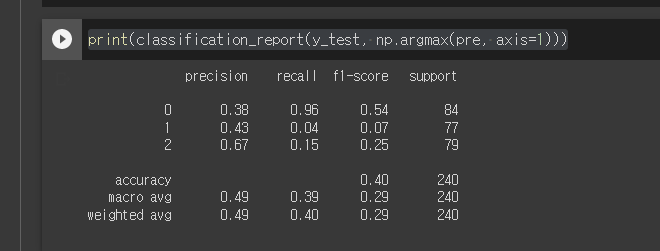
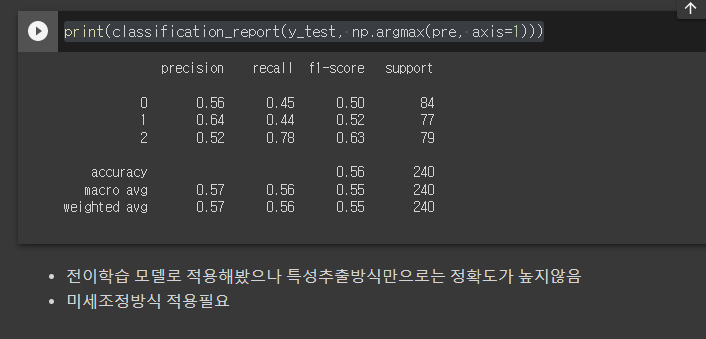
print(classification_report(y_test, np.argmax(pre, axis=1)))
# - classification_report(평가용정답, 예측용정답)
# - np.argmax() : 가장 큰 값의 인덱스를 반환하는 함수
# - axis : 2차원 배열인 pre의 내부 배열들(1차원)만 보겠다는 뜻